Deployment Options
The flowchart outlines the decision-making process for selecting the most suitable IDmelon Platform Deployment Option based on your organization’s requirements. It guides you through choices like cloud-based managed deployments or self-managed on-premises setups, considering factors such as infrastructure, operating systems, and deployment type. Below is a detailed breakdown of the options.
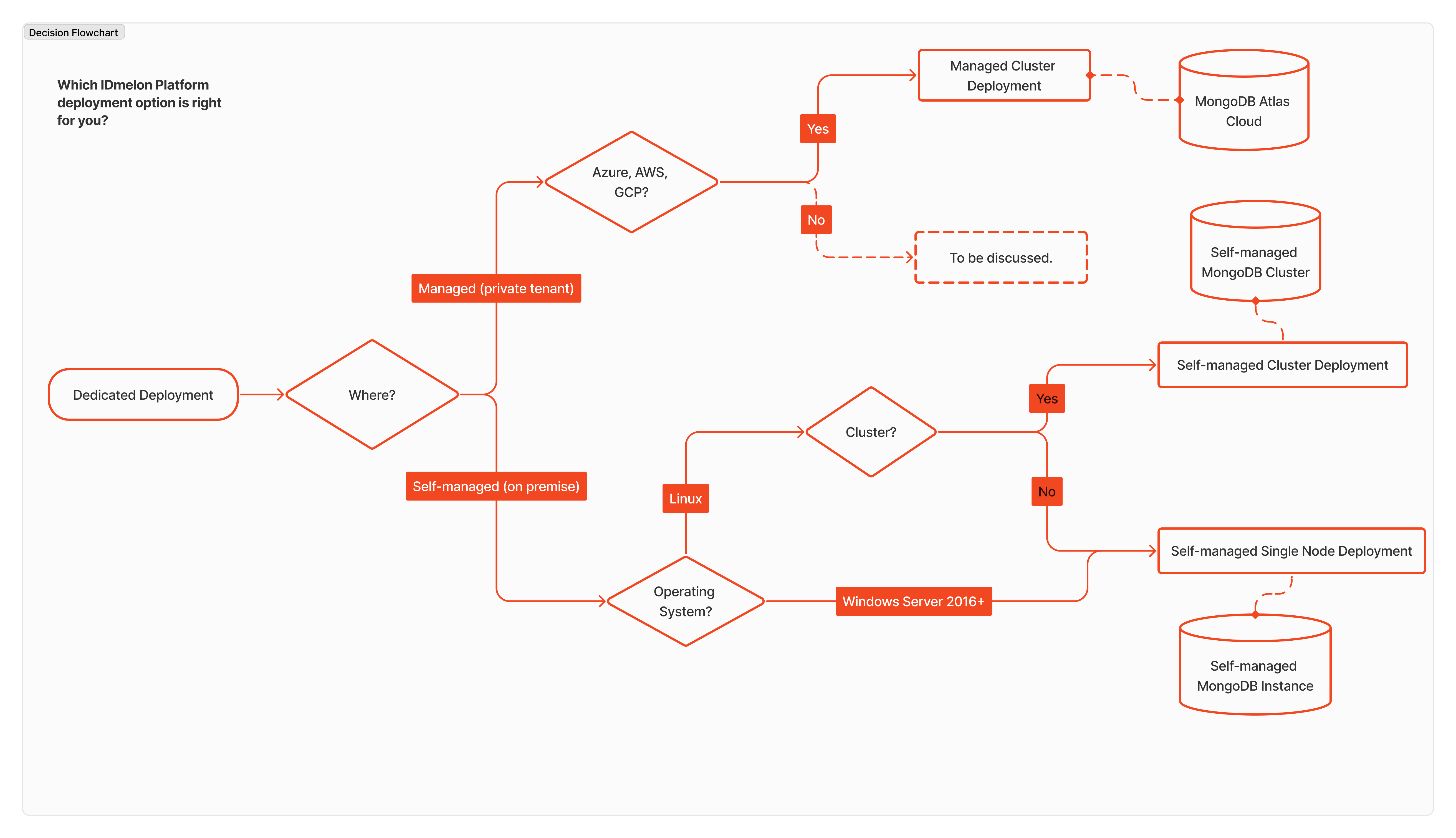
Managed Deployment
Managed deployments are designed for organizations looking to leverage public cloud infrastructure with minimal administrative effort. These deployments offer scalability, performance, and ease of management.
- Managed Cluster Deployment
- Hosted on cloud platforms like MongoDB Atlas Cloud.
- Ideal for organizations using Azure, AWS, or GCP.
- Features automatic scaling, backups, and optimizations, all managed by the cloud provider.
- Provides high availability and fault tolerance without requiring extensive operational expertise.
Self-Managed Deployment
Self-managed deployments cater to organizations that prefer full control over their infrastructure or have specific security and compliance requirements. These deployments are hosted in private environments or on-premises.
Single Node
Self-Managed Single Node Deployment
- Simplified deployment on a standalone server.
- Suitable for smaller-scale environments or non-critical applications.
- Requires less setup effort compared to cluster deployments but lacks redundancy and scalability.
- Minimum Requirements: Linux or Windows Server 2016+, CPU: 4 cores, RAM: 8 GB, Hard Drive: 50 GB.
Cluster
Self-Managed Cluster Deployment
- Designed for larger environments that need high availability and load balancing.
- Utilizes a cluster of nodes for resilience and performance.
- Offers greater scalability compared to single-node setups, making it ideal for mission-critical workloads.
- Requires additional expertise to manage and maintain but ensures redundancy and fault tolerance.
Update and Maintenance Policy
IDmelon keeps all deployments—whether SaaS, on-premises, or private cloud—on the same version with the same features and security updates.
Update Schedule
| Deployment Type | How Often | How It’s Delivered |
|---|---|---|
| SaaS | Ongoing | Automatic updates with no downtime |
| Dedicated (On-Prem/Private Cloud) | Monthly | Scheduled with your team |
IDmelon releases updates every month for dedicated deployments. Our support team works with you to schedule updates at a time that works for you and helps with the upgrade process.
Why Monthly Updates?
As a security product, staying up to date is important to protect your organization. Monthly updates give you:
- Security fixes — Get the latest patches delivered on time
- New features — Access to improvements as soon as they’re ready
- Feature parity — The same features as the SaaS version
- SLA coverage — Stay eligible for support and SLA terms
How We Roll Out Updates
IDmelon follows a step-by-step process to make sure updates are reliable:
- Internal Testing — All updates go through thorough testing
- SaaS First — Updates are deployed to SaaS first
- Waiting Period — We make sure there are no issues
- Dedicated Release — Tested updates are packaged for dedicated deployments
This means dedicated deployments get tried-and-tested updates, not untested releases—giving enterprise customers extra peace of mind.
Maintenance and Support
Dedicated deployments need an active Maintenance and Support agreement, which includes:
- Access to all updates and new releases
- Technical support for setup and upgrades
- Security update notifications
- Help with upgrades and documentation
For full details, see the IDmelon Service Level Agreement.
Third-party Services
The IDmelon platform uses the below services ensuring users can receive notifications, emails, SMS messages, and can communicate with organization’s Azure Active Director if needed.
Smartphone notification
For delivering notifications to users' smartphones.
- Firebase: Utilized for Android devices, Firebase provides a robust notification system that ensures timely delivery and efficient engagement with users.
- APN (Apple Push Notification service): Used for Apple devices, APN enables seamless notification delivery to iOS users, enhancing their experience with the platform.
This component is optional.
For sending emails to users for security key activation purposes and users administrators management.
- SES (Simple Email Service): Provided by Amazon Web Services (AWS), SES offers a reliable and scalable solution for sending emails, ensuring that important notifications and updates reach users' email inboxes promptly.
This component is required.
SMS
For sending SMS messages to users.
- Twilio: As a leading cloud communications platform, Twilio enables the integration of SMS functionality into the IDmelon platform, facilitating direct and effective communication with users via text messages.
This component is optional.
Entra ID (formerly Azure Active Directory)
For the source of user identities and access management for the IDmelon platform.
- Entra ID: A comprehensive identity and access management solution provided by Microsoft Azure, AAD enables secure authentication and authorization processes, ensuring that users have appropriate access to the platform’s resources and services.
This component is optional.